The Simulation Concept workflow
The Simulation Concept workflow (concept > Concepts > Simulation Concept) is the first step in the process of setting up a dynamic simulation incorporating geological uncertainties. These geological uncertainties are uncertainties assigned to the domain models in JewelSuite modeling workflows, and can be propagated to dynamic simulation via the Simulation Study without the need of extra scripting. Setting up the simulation study is the second step in the process, and requires a simulation case which has a simulation concept as input.
A concept is a set of interdependent domain models (e.g., a structural model, 3D grid, porosity model), generated in the corresponding strip workflows and representing one conceptual idea of your reservoir model. In the simulation concept workflow, you select the 3D grid and assign the associated grid properties to be used in the simulation. Working with a simulation concept as input to the simulation ensures that models are geologically consistent and model dependencies are retained.
Only uncertainties from models that are part of the simulation concept can be propagated further in a simulation study. These include:
- Structural Model (via 3D grid)
- Porosity Model (PORO)
- Permeability Models (PERMI, -J, -K)
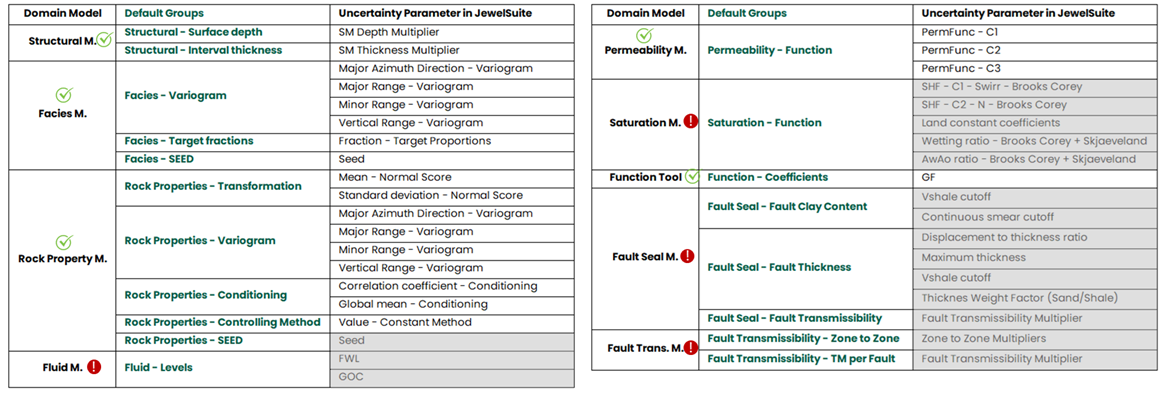
Overview of supported and unsupported JewelSuite uncertainties in a simulation study. click to enlarge
As an important note on model uncertainties to be used for simulation study purposes, the following uncertainties are not yet supported:
- Fluid Model Although a fluid model can be assigned to a simulation concept, its uncertainties are currently not supported.
- Saturation Model Saturation model uncertainties are currently not supported.
- Fault Transmissibility Model (FTM) FTM uncertainties are not yet supported
- Facies Model and Rock Property Model Seed number uncertainties for these models are not yet supported.
Order of steps
Once you have created your simulation concept, you need to assign it to the IMEX, GEM or STARS simulation case to propagate the information of the domain models to the simulation case. You do this with the Create Case forms of the IMEX, GEM or STARS strip. Once the simulation concept has been assigned to the simulation case, you need to build the deck and run the simulation case. Later you can proceed with the second step of setting up uncertainty for dynamic simulation, which is creating the simulation study with the Simulation Study workflow located in the jewellabs strip. For more information, see Simulation Study.
For information on the steps of the Simulation Concept workflow, see: